n8n
Learn how to integrate n8n with Puzzle to sync and manage your automation workflows inside your process maps.
Written By Jolly Amurao
Last updated About 3 hours ago
Available with any of the following subscriptions, except where noted:🟢 Starter (up to the plan’s step limit) | 🟣 Optimizer | Enterprise
Automations don’t live in silos. They connect tools, trigger systems, and quietly power day-to-day operations behind the scenes. But as they scale, understanding how they fit into your broader workflows becomes harder and more critical.
Puzzle’s integration with n8n brings visibility and structure to those automations. It transforms backend flows into clear, connected steps inside your operational maps. No more guessing what a workflow does or where it runs. You’ll see it exactly where it belongs, alongside the people, tools, and processes it powers.
This guide walks you through integrating your n8n instance, pulling in your workflows, and documenting them visually in Puzzle.
Benefits of Integrating n8n with Puzzle
🔍 End-to-End Visibility: See exactly where your automations live inside your workflows. Each n8n automation appears as a visual step—fully mapped, contextual, and connected.
⚙️ Simplified System Management: Avoid confusion and duplicated logic. By syncing your n8n workflows into Puzzle, you’ll know what’s already built, what’s connected, and where it runs.
👥 Collaborative Documentation: Help teammates, stakeholders, and non-technical collaborators understand what’s happening behind the scenes—without diving into raw logic or code.
Video Guide: Integrate with n8n
Step-by-Step Guide: Setting Up the n8n Integration in Puzzle
1️⃣ Add and Sync Your n8n Instance
1️⃣ Add and Sync Your n8n Instance
🏠 Go to your Puzzle workspace > Tools Canvas
👉 Click the 🔍 icon to open the Tools Library.
➕ If n8n is not yet added to your canvas → search n8n → click Add. If n8n is already on your Tool Canvas, click it to open its tool sidebar.
🔄 Click the purple Sync icon.
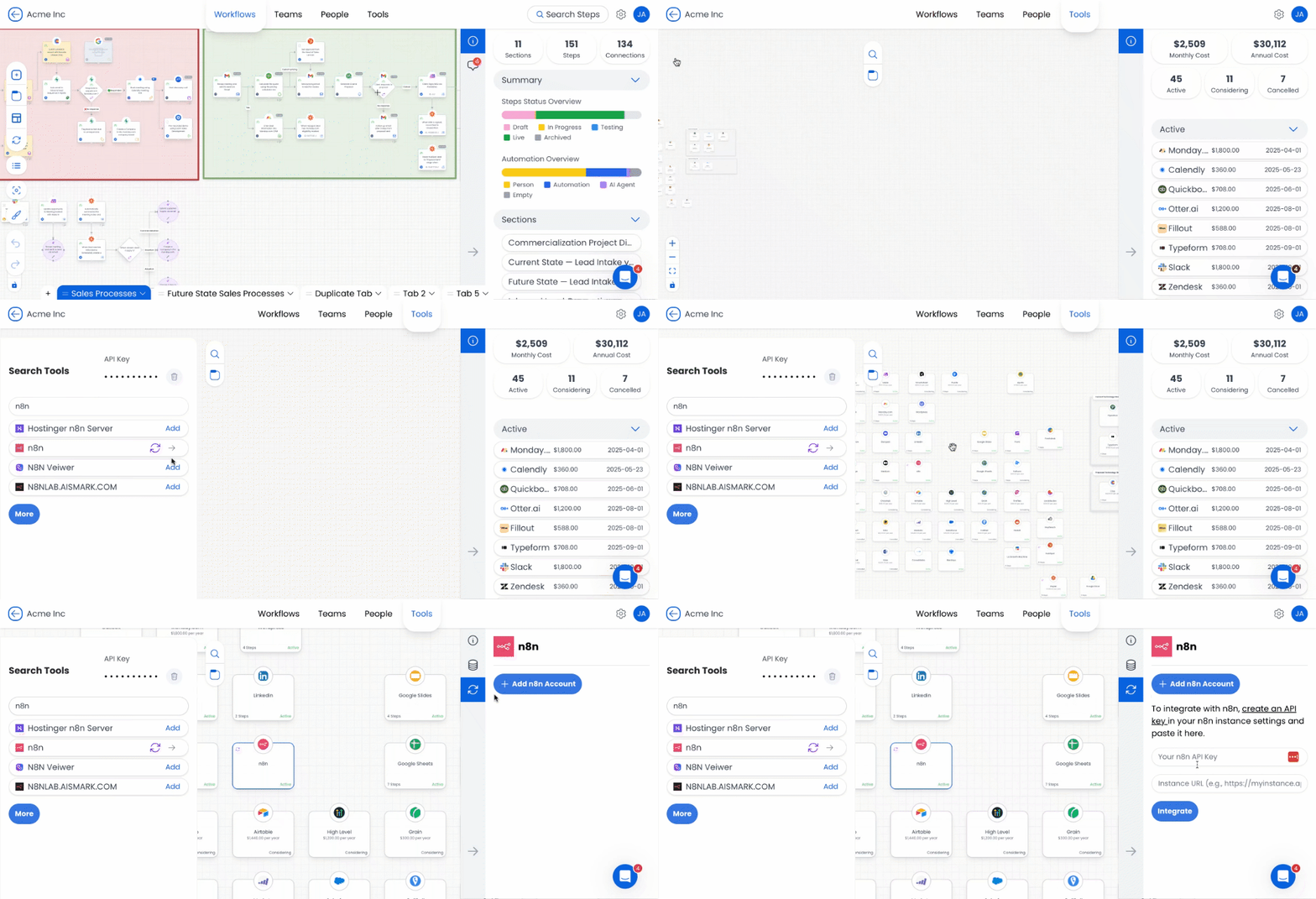
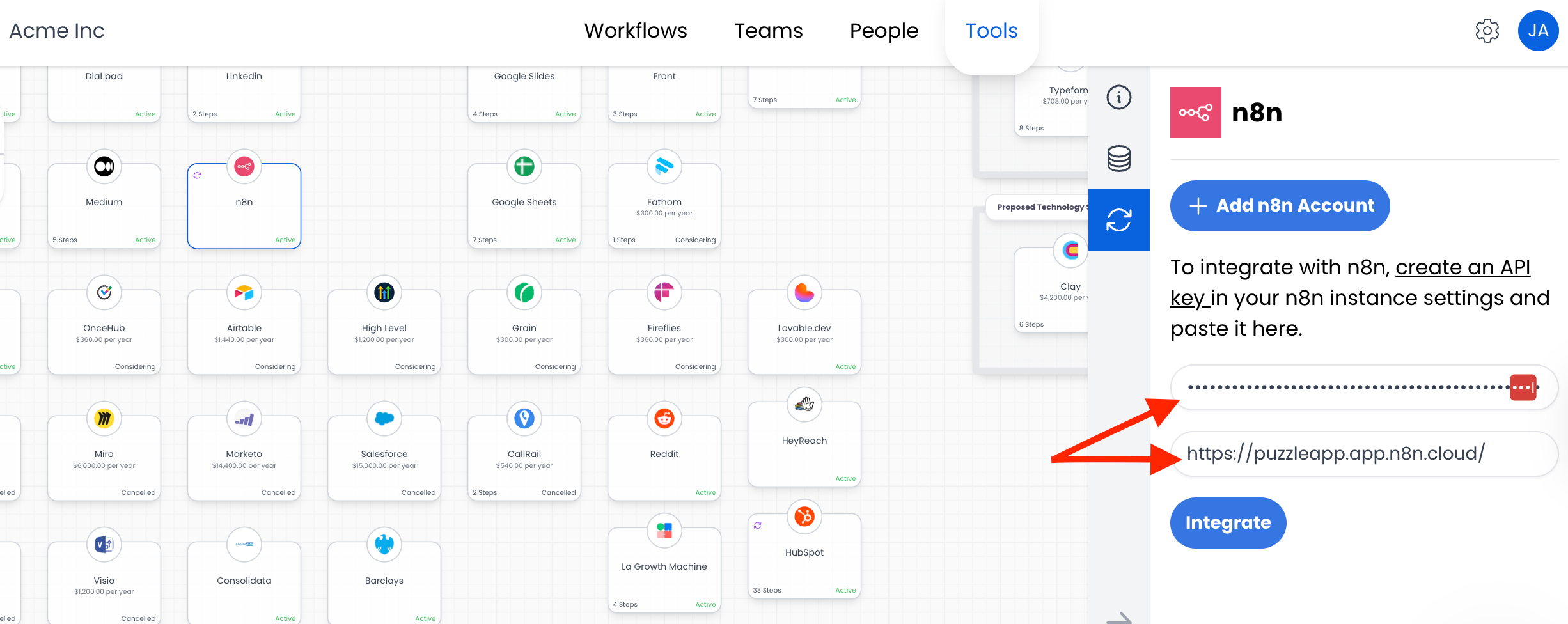
🔓 To authenticate your n8n instance, you’ll be prompted to enter:
n8n API Key → Generated from your n8n instance
Instance URL → e.g., https://yourcompany.n8n.cloud
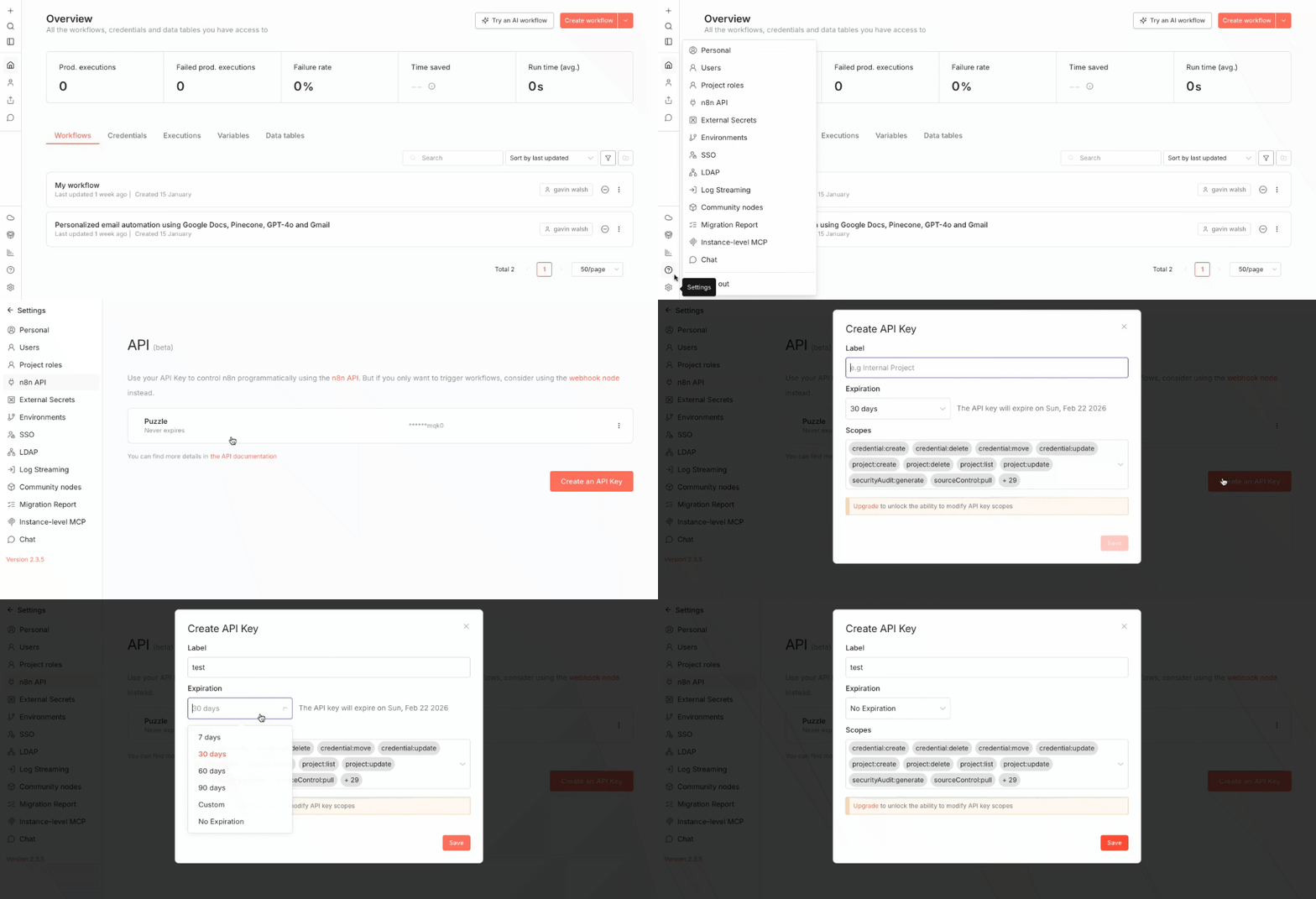
🔑 How to get your n8n API Key:
Log in to your n8n instance
Go to Settings > n8n API
Click Create API Key and give it a name (e.g.,
Puzzle Main)Copy the key and paste it into Puzzle
Paste your instance URL
Click Integrate
Your account will be listed under your name by default, but you can rename it for clarity.
2️⃣ Add Synced Workflows to the Canvas
2️⃣ Add Synced Workflows to the Canvas
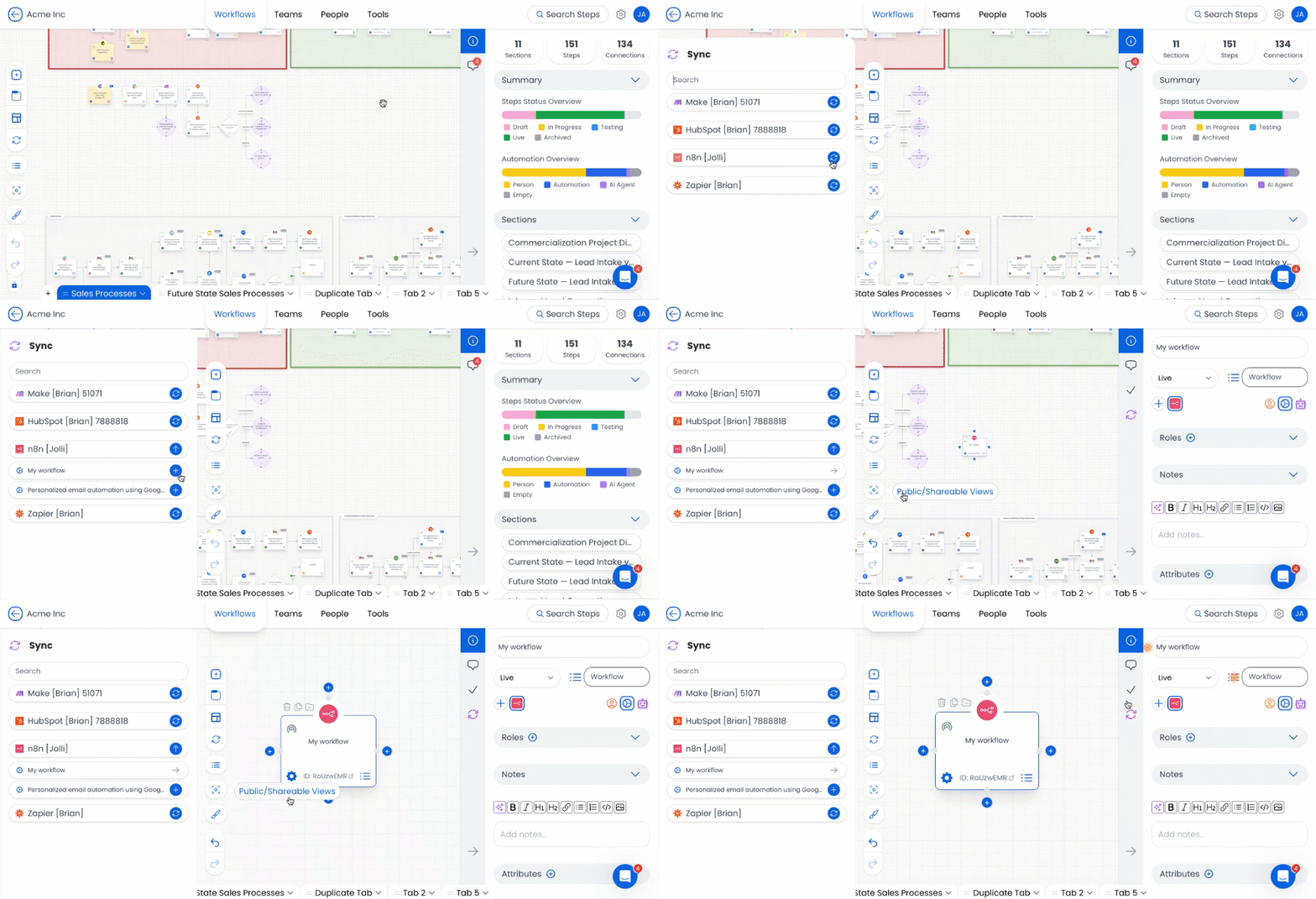
📋 Go to the Workflows tab in your Puzzle workspace.
🧩 Click the Integration Sidebar toggle (↻ icon in top bar)
🔍 Find your connected n8n instance.
🔄 Click the blue ↻ icon again to load available workflows.
🔄 Click the + icon next to a workflow to add it as a step
💡 When you add a step:
The ➕ icon turns into a gray arrow to show it’s been added
A direct link to the workflow is added in the sidebar
You can annotate it with:
Notes
Roles
Tools
Training links
3️⃣ Link an Existing Step to an n8n Workflow
3️⃣ Link an Existing Step to an n8n Workflow
If a step already exists in Puzzle that corresponds to a workflow:
🎯 Click the step to open its sidebar
🔗 Click the purple Sync icon, then click the blue ↻ to fetch workflows
➕ Find your workflow and click + to connect it
Once synced:
A workflow ID appears in the sidebar
A quick link to your live workflow is included
This sync is visible in Shared Views
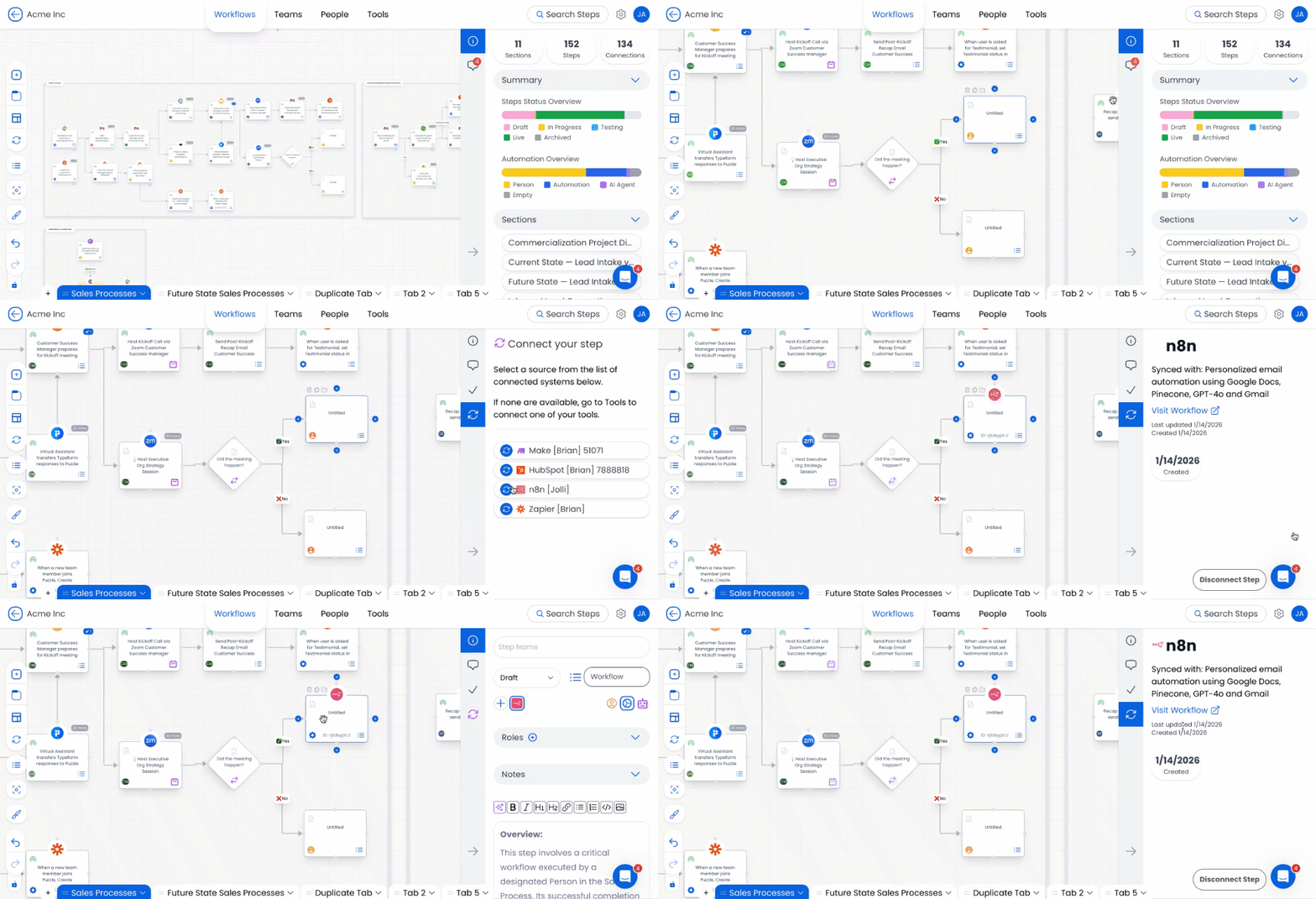
🚨 Important: If you don’t see the Sync icon in your step sidebar, you may need to enable it first.
How to Enable Sync in Step Sidebar Configuration:
Go to Workspace Settings in Puzzle.
Navigate to Step Sidebar Configuration.
Toggle ON the Sync input.
Click Save, and your Step Sidebar will update automatically.
Now, when you open a step, the Sync option will be available, allowing you to connect HubSpot workflows seamlessly.
4️⃣ Disconnect an n8n Workflow
4️⃣ Disconnect an n8n Workflow
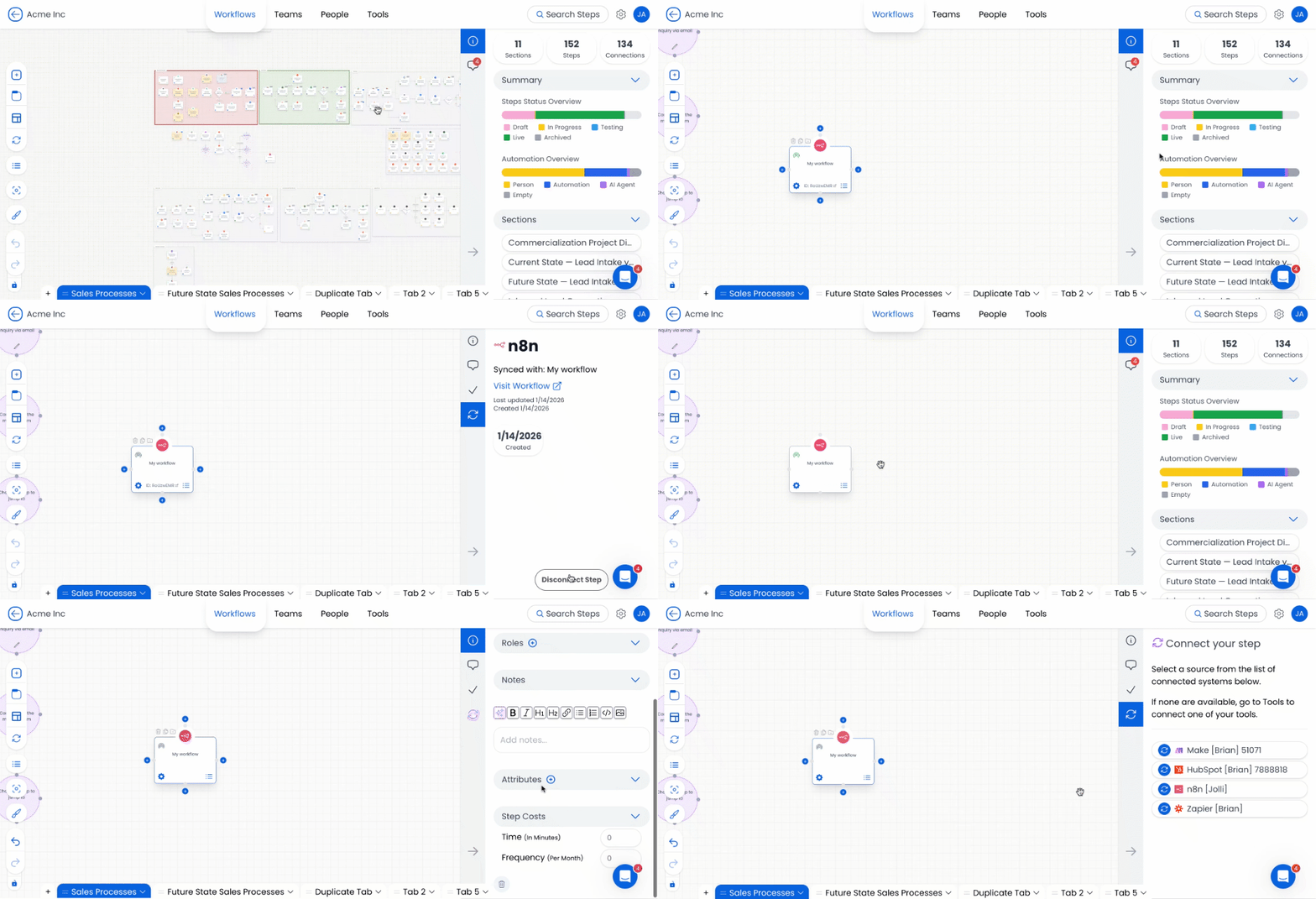
🖱️ Select the synced step.
👉 Open the Sync panel.
❌ Click Disconnect Step at the bottom.
Best Practices for Integrating n8n
📚 Name workflows clearly in n8n to make them easier to locate and sync.
✏️ Add documentation and context directly into synced steps for smoother onboarding and updates.
📅 Keep your instance synced regularly so your visual map stays current with what’s live in n8n.
Security & Data Access
Puzzle’s n8n integration is designed for safe visibility without compromising sensitive automation data.
✅ Authentication is secured through n8n’s instance connection
✅ Only metadata is retrieved, including:
Workflow name
ID
Active status
Timestamps
❌ No execution logs, secrets, or payloads are accessed
This ensures you can map and manage your automation architecture safely.
Conclusion
Automations should be visible—not buried in the background. Puzzle’s n8n integration brings your automation workflows into the same space as your team, tools, and processes. Whether you're auditing systems, onboarding new teammates, or managing change, this integration ensures your automations are clearly mapped and easy to understand.
Start integrating today and bring structure, transparency, and collaboration to your automation landscape.
Still need help? Ask the team